![PLAYIT_RGB_wit.png]](https://support.playit.training/hs-fs/hubfs/PLAYIT_RGB_wit.png?height=40&name=PLAYIT_RGB_wit.png)
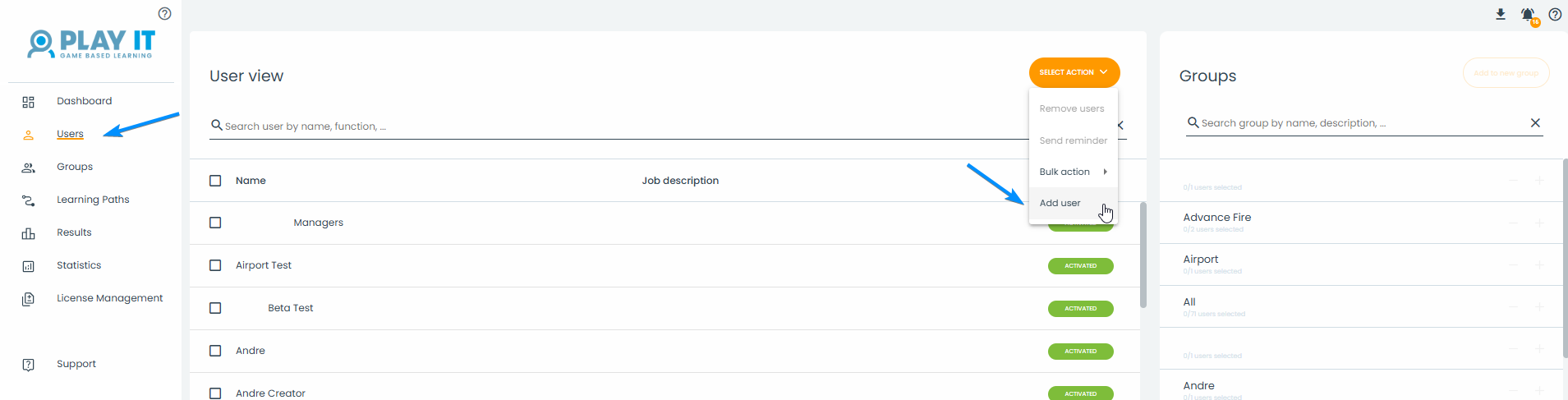
You can add a users on the 'Users' page by clicking on the button 'Select Action'.
Here you click on 'Add User' and a pop-up will appear.
Fill in the name and the email address of the user you want to add.
The moment you click on 'Add User', the newly created user will receive an email.
This email will contain an activation email for their account that will enable them to set a password and gain access to the game platform.
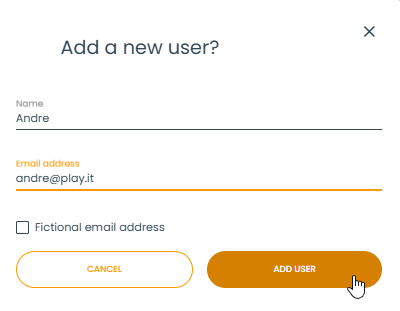
When the new user doesn't have a company email address you can check the 'Fictional email address' box.
This will give you the possibility to configure a password for the new user.
The password should have a lowercase and uppercase letter, a number and must be 6-20 characters long
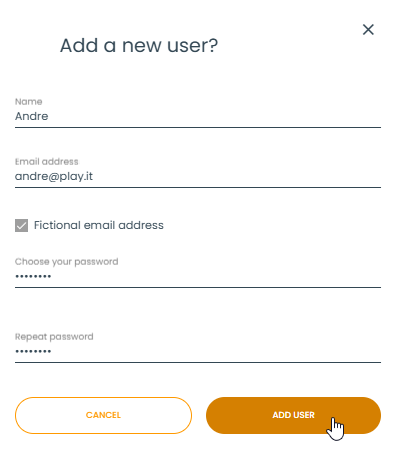
Once you put in the password and confirmed it, you can click 'Add User'.
Of course because you chose a non existing email address, you will need to inform the new user that they can login using the fictional email address and password you configured.